Git 完整教學
tobiichi教授🛐🛐🛐
Intro
這是tobiichi3227教授客座台南一中科學班的教學內容,簡報連結
Self-introduction
- 台南一中113級畢業
- 成大資工系智慧系統組
- TOJ 、 TNFSH-scoreboard 、TCC/NCC 的開發者
有希實驗室
Question: 怎麼管理專案
通常分成兩種人:會用git 跟 不會用git
不會用git的人
Q1: 平時會怎麼做版本管理
A: 開一堆資料夾然後複製一堆檔案
Q2: 平時會怎麼做多人協作
A: 開個雲端把檔案傳上去分享或是在訊息傳一堆檔案
有什麼缺點
- 重複檔案過多
- 誤操作導致出錯
- 難以尋找檔案
- …
Git 核心概念
- 工作區 (working directory)
- 暫存區 (staged/cached area)
- 倉庫 (repository)
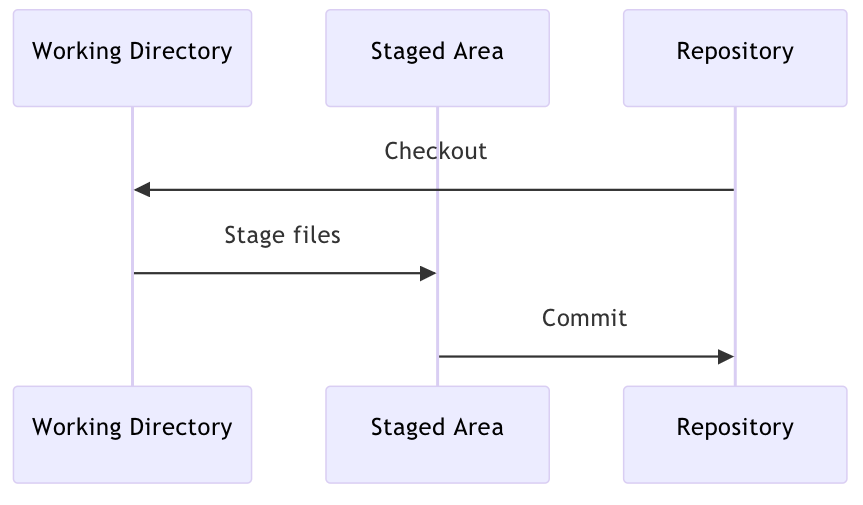
Git workflow
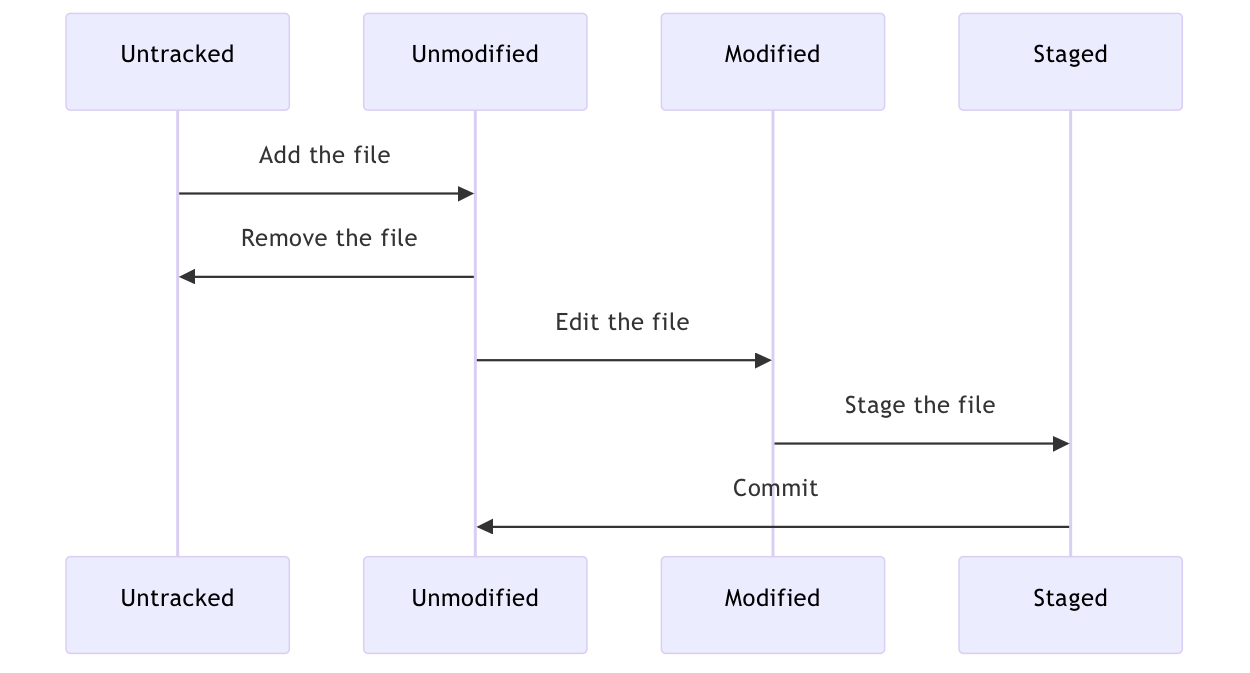
Git 基礎指令
1. git config 設定 git
git config --local user.email "[email protected]"
git config --local user.name "yourname"

# 在自己的設備上可以直接用 global
git config --global user.email "[email protected]"
git config --global user.name "yourname"
2. 初始化倉庫
# 本地資料夾加入初始化文件
git init

# 連結遠端 (Github) 儲存庫
git remote add origin <repo_url>

# (Optional) 將指定的目錄標記為「安全目錄」。 (該目錄的擁有者與目前使用者不一致需要設定)
git config --global --add safe.directory '<local_folder>'
3. git add 追蹤檔案或暫存已修改檔案
git add new-file
git add modified-file
git add --all
git add .
4. git commit 提交修改
git commit
git commit -m 'commit message'
5. git rm 刪除檔案
git rm file
# 等價於
rm file

git add file

git rm --cached file # 取消追蹤已追蹤的檔案
6. git mv 移動或重命名檔案
git mv oldfile newfile
# 等價於
mv oldfile newfile
git rm oldfile
git add newfile
7. git status 顯示檔案的狀態
git status8. git diff 顯示具體檔案變更內容
git diff # 顯示工作區的變更
git diff --staged # 顯示暫存區的變更
9. git restore 恢復檔案或是取消對檔案的修改
git restore file # 把工作區的檔案
git restore --staged file # 取消 git add 的結果
10. git log 顯示歷史紀錄
git log -p # 顯示檔案具體變更,輸出類似 git diff
git log --stat # 顯示變更統計
git log --oneline # 只顯示 commit hash 與 commit message
11. .gitignore 忽略某些檔案或目錄
ignore_file
ignore_directory/
*.ignore_extension
Member discussion